The command center for
modern restaurants.
Skotla unifies staff, scheduling, inventory, waste, sales insights, and AI daily reports — so operators stop juggling tabs and start running a tighter business.
Built for restaurants, cafes, bakeries, and delis. Works alongside your existing POS.
Restaurants lose money in the small details.
Most operators are running their business across spreadsheets, group chats, and paper notes. The cost shows up in margins.
Clock-ins and timesheets get messy
Missed punches and labor cost surprises at the end of the week.
Waste goes unnoticed
Small losses compound until margins quietly disappear.
Inventory runs out at the worst time
Par levels live in someone's head — not in a system.
Closing tasks slip through
Without a checklist, things get forgotten when it's busy.
Customer complaints arrive too late
Negative reviews surface after the guest is already gone.
Sales reports don't drive action
Numbers without context don't tell you what to do tomorrow.
See your entire day at a glance.
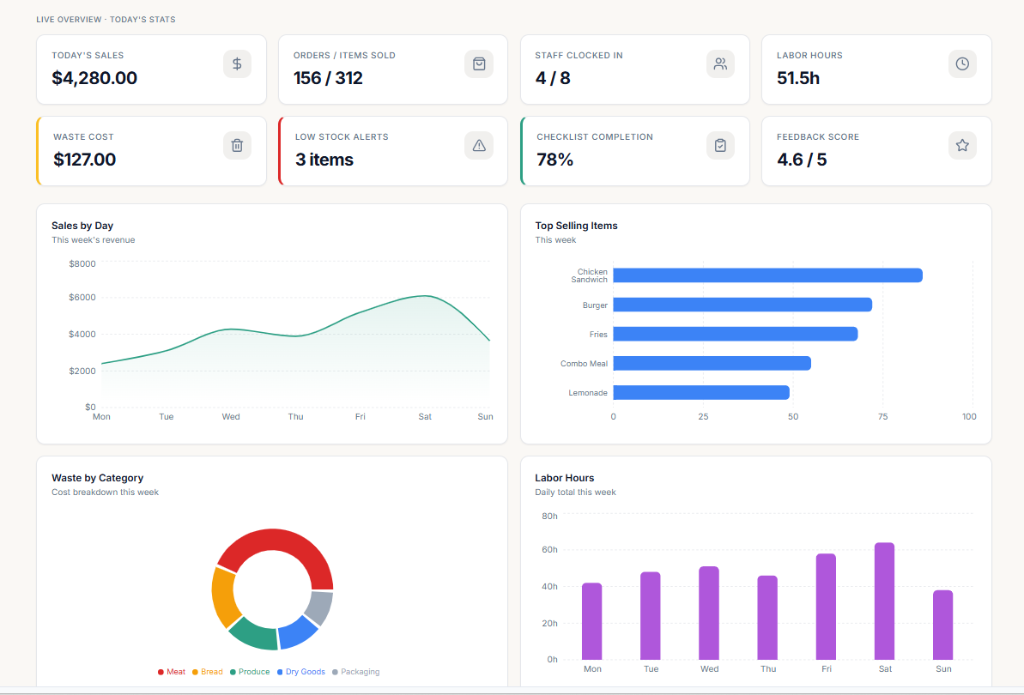
One dashboard for sales, labor, waste, inventory alerts, and guest feedback. No more switching between five tools to know how today is going.
Today's Sales
$4,280
Orders
156
Staff Clocked In
4 / 8
Waste Cost
$127
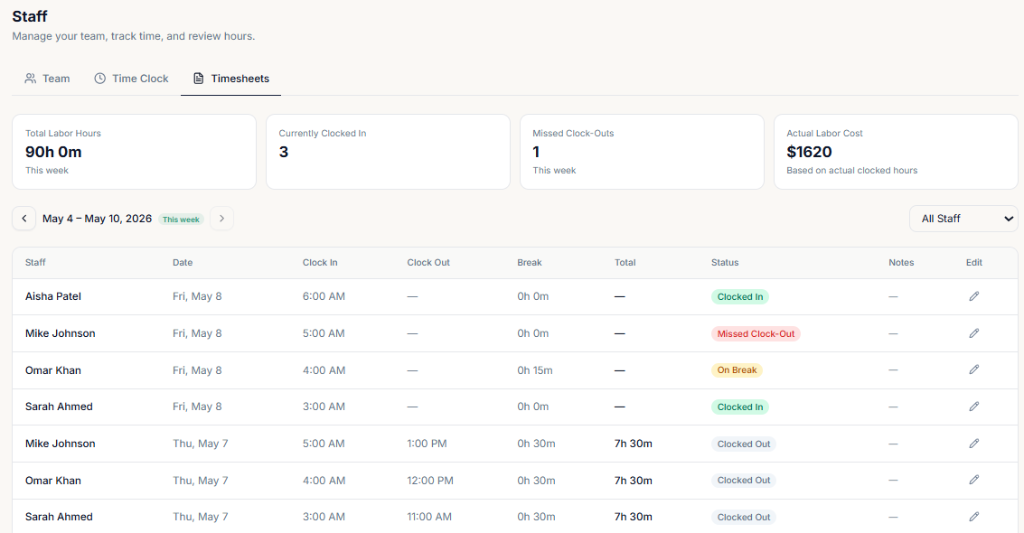
Track time, control labor cost.
Clock-ins, timesheets, missed punches, and actual labor cost — all in one view. Catch overtime before it becomes a problem.
- Real-time clock-in status across roles
- Automatic missed clock-out detection
- Actual vs. scheduled labor cost
- Editable timesheets with audit trail
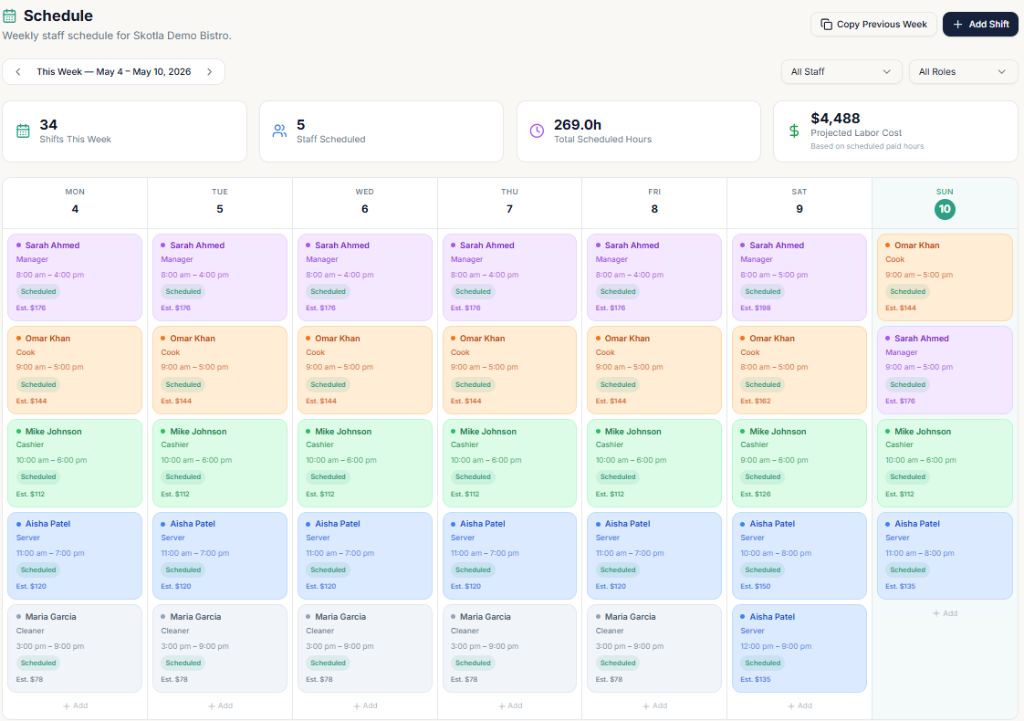
Build the week in minutes.
Weekly scheduling with projected labor cost as you build. Copy last week, swap shifts, and publish to your team.
- Projected labor cost per shift and per week
- Copy previous week with one click
- Filter by staff and role
- Color-coded by role for quick scanning
Two of the hardest costs to control — finally measurable.
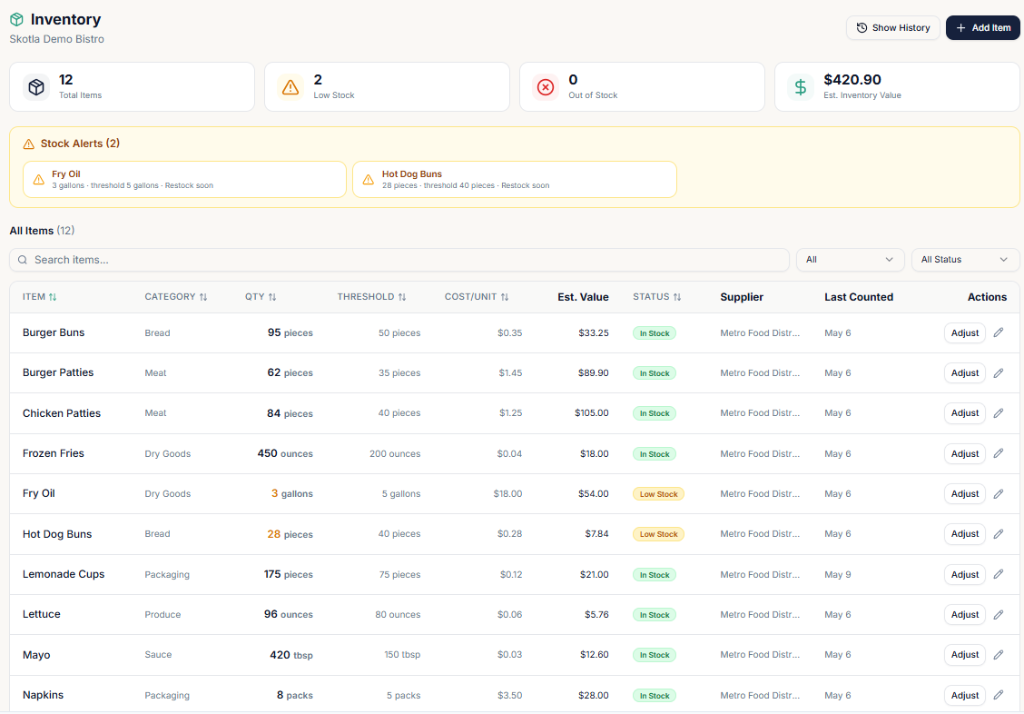
Inventory Tracking
Set par levels per item, log counts, and get automatic low-stock alerts before you run out.
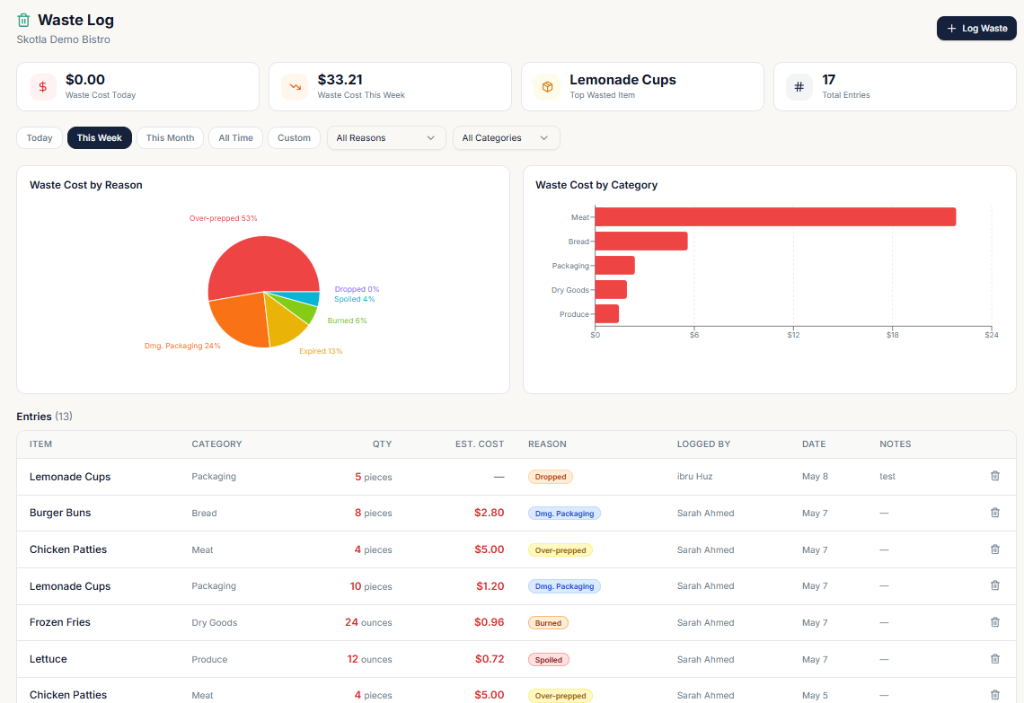
Waste Log
Log waste in seconds. See cost broken down by reason, category, and item — and stop the leaks.
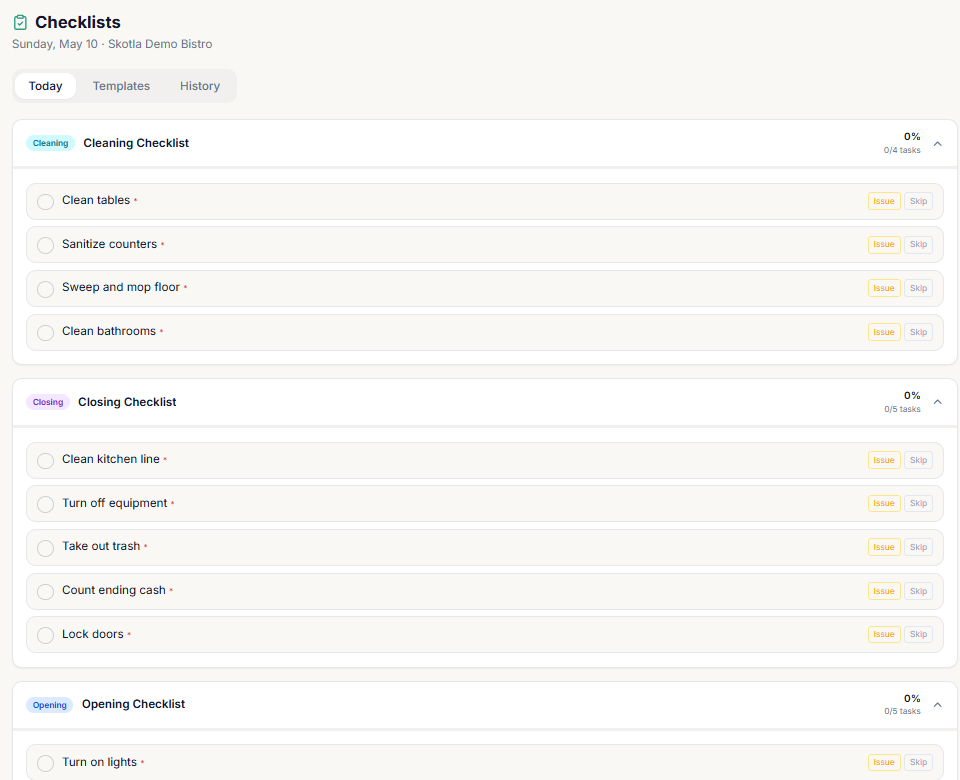
Opening, closing, cleaning — done right, every shift.
Templated checklists make sure nothing gets missed. Staff check off tasks, flag issues, and you see completion in real time.
- Reusable templates for opening, closing, and cleaning
- Per-task issue reporting
- Live completion percentage by checklist
- History across shifts and dates
Numbers and voices, in one place.
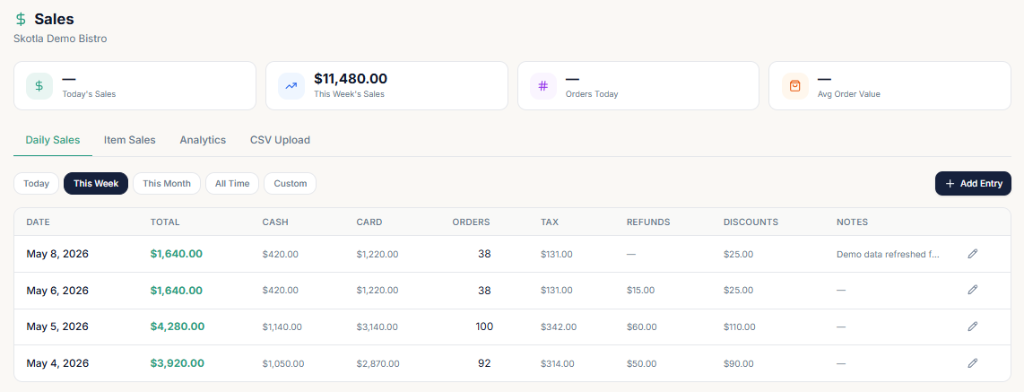
Sales Insights
Enter daily sales manually or upload POS CSVs. Track cash, card, tax, refunds, and discounts over time.
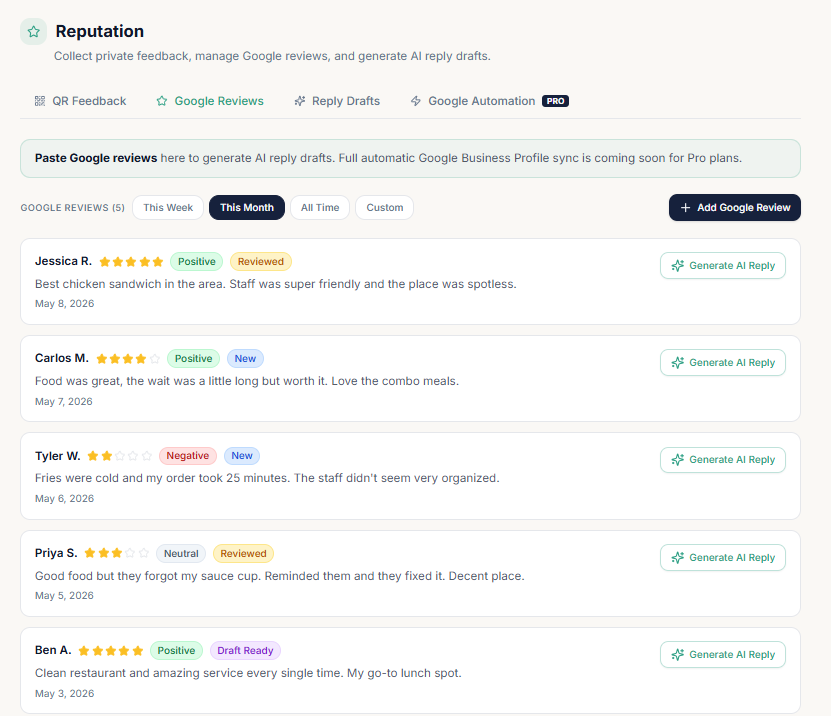
Reputation & Feedback
Collect private QR feedback before it hits Google. Manage reviews and generate AI reply drafts on the spot.
Everything you need. Nothing your POS already does.
One product, built specifically for the operational side of running a food business.
Staff & Time Clock
Roles, clock-in, and timesheets without spreadsheets.
Scheduling
Build the week with projected labor cost in real time.
Checklists
Opening, closing, and cleaning routines that actually get done.
Inventory
Par levels, counts, and low-stock alerts.
Waste Log
Track loss by item, reason, and category.
Sales Insights
Manual entry or POS CSV upload, with trends over time.
Menu & Recipe Usage
Link recipes to menu items and estimate ingredient usage.
AI Daily Reports
A clear summary of what happened — and what to do tomorrow.
Reputation & Feedback
Private QR feedback and Google review management in one inbox.
Wake up to a clear picture of your restaurant.
Skotla turns yesterday's data into a short, actionable briefing — so you start the day knowing exactly where to focus.
Summary. Sales were 12% above last Wednesday, driven by a strong dinner service. Labor stayed within target.
Watch. Chicken waste was 28% higher than the weekly average. Two inventory items dropped below par. One negative guest review needs a response.
Action. Adjust chicken prep, restock fry oil and hot dog buns, and reply to Tyler W.'s review before noon.
From setup to insights in five steps.
Set up your restaurant
Add your location, roles, and basic operating details.
Add staff, inventory, and checklists
Bring your team in and load your starting items and routines.
Enter sales or upload POS reports
Manual daily entry or CSV uploads from your existing POS.
Track waste and customer feedback
Capture the data that's silently driving your margins.
Get AI reports and action steps
Receive a daily briefing that tells you what to focus on.
Skotla doesn't replace your POS. It completes it.
Toast, Square, Clover, and others handle orders and payments. Skotla manages everything around them.
Your POS handles
- Orders
- Payments
- Receipts
- Card readers
Skotla handles
- Staff & timesheets
- Scheduling
- Inventory & par levels
- Waste tracking
- Sales insights
- AI daily reports
- Guest feedback & reputation
Simple plans for serious operators.
Frequently asked questions
Is Skotla a POS system?+
Can I use Skotla with Toast, Square, or Clover?+
Can my staff use Skotla?+
Is Skotla for one restaurant or multiple locations?+
Ready to run a tighter operation?
Join operators who use Skotla to control labor, cut waste, and act on guest feedback before it costs them.